Overview
This guide demonstrates how to build a web application using Actix Web and MongoDB. Actix is a powerful asynchronous web framework for Rust that makes it easy to build fast, type-safe HTTP services.
The application in this tutorial consists of the following layers:
Database Layer: MongoDB (hosted on MongoDB Atlas) stores and retrieves data.
Server Layer: Actix Web provides the HTTP server, routing, and API endpoints to connect your frontend to your MongoDB database.
Data Management Layer: Rust's type system and async/await provide safe data handling with compile-time guarantees.
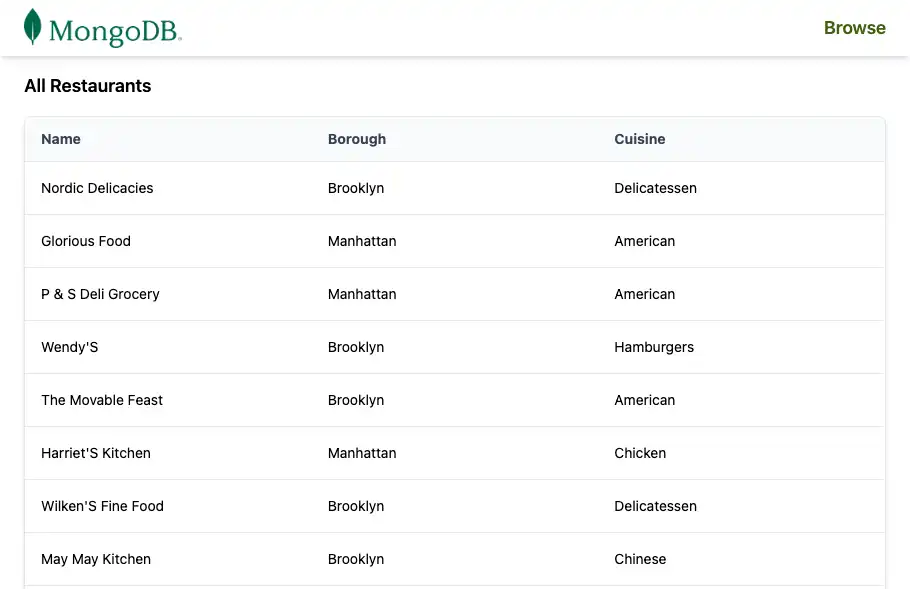
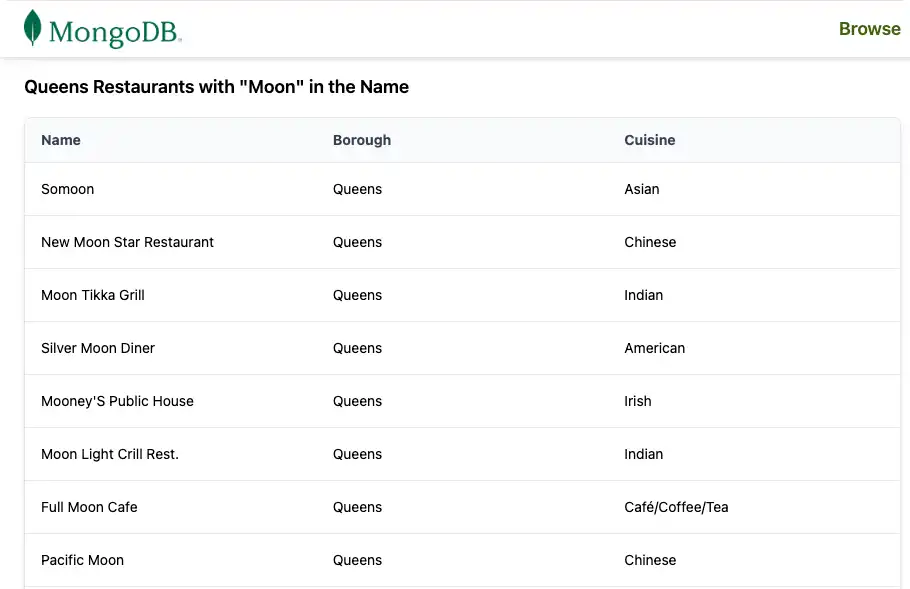
Presentation Layer: Server-rendered HTML pages, styled with Tailwind CSS, display the sample restaurant data in a table.
You will build a small application that:
Connects to a MongoDB Atlas cluster that contains the
sample_restaurantsdatasetExposes a
/restaurantsendpoint that lists all restaurantsExposes a
/browseendpoint that lists restaurants in Queens with"Moon"in the nameRenders the results as an HTML table with a shared navigation bar
Why Use MongoDB in an Actix Application?
MongoDB's flexible document model stores data as BSON/JSON-like documents. This works naturally with Rust structs that model your data, without complex ORM layers or schema migrations.
When you combine Actix Web and the async MongoDB Rust driver, this stack provides:
Flexible data structures that can evolve without costly migrations
Async, non-blocking I/O for high concurrency and performant APIs
Strong type safety from the database layer up through your handlers and models
Simple integration with web views (HTML templates or manual string building, as in this tutorial)
This combination works for applications that need the following:
Evolving schemas over time
High throughput and concurrency
Strong compile-time guarantees about data shapes
Quick Start Tutorial
This tutorial guides you through building an Actix Web application that integrates with MongoDB. The application accesses sample restaurant data in a MongoDB Atlas cluster and displays the results in your browser.
Tip
If you prefer to connect to MongoDB by using the Rust driver without Actix Web, see the Rust Driver Quick Start guide.
Set Up Your Project
Follow the steps in this section to install prerequisites, create a MongoDB Atlas cluster, and scaffold the Rust project.
Verify the prerequisites
To create the Quick Start application, ensure you have the following installed:
Prerequisite | Notes |
|---|---|
Rust | Install the latest stable version of Rust. |
Code Editor | This tutorial uses Visual Studio Code with the Rust extension, but you can use the editor of your choice. |
Terminal | Use Terminal or similar app for MacOS. Use PowerShell for Windows. |
Create a MongoDB Atlas cluster
MongoDB Atlas is a fully managed cloud database service that
hosts your MongoDB deployments. If you do not have a MongoDB
deployment, create a MongoDB cluster for free (no credit card
required) by completing the MongoDB Get Started
tutorial. The MongoDB Get Started tutorial also demonstrates
how to load sample datasets into your cluster, including the
sample_restaurants database that this tutorial uses.
Important
Ensure you have the sample_restaurants dataset loaded into your cluster before proceeding. A missing sample_restaurants dataset results in empty restaurants lists on your sample pages.
To connect to your MongoDB cluster, use a connection URI. To learn how to retrieve your connection URI, see the Add your connection string section of the MongoDB Get Started tutorial.
Tip
Save your connection URI in a secure location. You will
add it to a .env file later.
Configure your project dependencies
Open Cargo.toml and replace the [dependencies] section with the following:
[package] name = "actix_quickstart" version = "0.1.0" edition = "2024" [dependencies] actix-web = "4" actix-files = "0.6" actix-cors = "0.7" mongodb = "3.4.1" tokio = { version = "1", features = ["rt-multi-thread", "macros"] } serde = { version = "1.0", features = ["derive"] } serde_json = "1.0" dotenv = "0.15" futures = "0.3"
Install the new dependencies by running the following command in your terminal:
cargo build
These dependencies provide:
actix-web: HTTP server, routing, and request/response types.mongodb: Official async MongoDB driver for Rust.tokio: Async runtime used by Actix Web and the MongoDB driver.serde/serde_json: Serialization and deserialization for JSON and BSON data.dotenv: Loads environment variables from a .env file for local development.futures: Utilities for working with async streams (used for MongoDB cursors).
Configure the Back End
After you set up the project, follow the steps in this section to configure environment variables, set up your MongoDB connection, define your data model, and implement the database query services.
Configure your environment variables
Create a .env file at the root of your project to store
your MongoDB connection URI.
Run the following command in your project root:
touch .env
Open .env and add your connection URI and port number:
MONGO_URI="<your-mongodb-connection-uri>" PORT=5050
Replace <your-mongodb-connection-uri> with the connection URI
you saved earlier.
Create the database connection module
Create a new file named db.rs in the src directory to
manage the MongoDB connection.
Run the following command in your project root:
touch src/db.rs
Open db.rs and add the following code to set up the MongoDB
client and database connection:
use mongodb::{options::ClientOptions, Client, Database}; pub async fn init_db(mongo_uri: &str) -> Database { let mut client_options = ClientOptions::parse(mongo_uri) .await .expect("Failed to parse MongoDB connection string"); client_options.app_name = Some("actix_quickstart".to_string()); let client = Client::with_options(client_options) .expect("Failed to initialize MongoDB client"); client.database("sample_restaurants") }
This module:
Parses the MongoDB connection string from your environment.
Configures the driver's app_name for easier observability.
Creates a Client and returns a Database handle for the
sample_restaurantsdatabase.
Define the restaurant data model
Create a new file named models.rs in the src directory to
define the restaurant data model.
Run the following command in your project root:
touch src/models.rs
Open models.rs and add the following code to define the
Restaurant struct:
use mongodb::bson::oid::ObjectId; use serde::{Deserialize, Serialize}; pub struct RestaurantRow{ pub name: Option<String>, pub borough: Option<String>, pub cuisine: Option<String>, pub id: Option<ObjectId>, }
This struct represents a restaurant document in the MongoDB collection. It uses Serde annotations to map BSON fields to Rust struct fields.
Create the restaurant query service
Create a service module that isolates MongoDB query logic from the HTTP handlers.
Run the following commands in your project root:
mkdir -p src/services touch src/services/restaurant_queries.rs
Open restaurant_queries.rs and add the following code:
use futures::stream::TryStreamExt; use mongodb::{ bson::doc, Collection, }; use crate::models::RestaurantRow; pub async fn fetch_all(restaurants: &Collection<RestaurantRow>) -> Result<Vec<RestaurantRow>, mongodb::error::Error> { let cursor = restaurants .find(doc! {}) .projection(doc! { "name": 1, "borough": 1, "cuisine": 1, "_id": 1, }) .await?; cursor.try_collect().await } pub async fn fetch_by_borough( restaurants: &Collection<RestaurantRow>, borough: &str, name: &str, ) -> Result<Vec<RestaurantRow>, mongodb::error::Error> { let filter = doc! { "borough": borough, "name": { "$regex": name, "$options": "i" } }; let cursor = restaurants .find(filter) .projection(doc! { "name": 1, "borough": 1, "cuisine": 1, "_id": 1, }) .await?; cursor.try_collect().await }
This file contains two async functions:
fetch_all(): Returns all restaurants with a field projection.fetch_by_borough(): Returns restaurants filtered by borough and by a case-insensitive name regex.
Both functions return Vec<RestaurantRow> so your presentation
layer does not need to deal with raw BSON.
Configure the Front End
Now that the database and service layers are in place, configure Actix Web to:
Initialize the MongoDB connection
Define shared application state
Expose the
/restaurantsand/browseendpointsRender HTML pages with Tailwind CSS
Create the HTTP route handlers
Create a module that holds your Actix Web HTTP route handlers and HTML rendering logic.
From your project root, run the following command:
touch src/pages.rs
Open pages.rs and add the following code:
use actix_web::{get, web, HttpResponse, Responder}; use crate::{ AppState, models::RestaurantRow, services::restaurant_queries, }; // Test endpoint to fetch all restaurants async fn get_restaurants(data: web::Data<AppState>) -> impl Responder { let result = restaurant_queries::fetch_all(&data.restaurants).await; match result { Ok(rows) => { let html = render_table_page("All Restaurants", &rows); HttpResponse::Ok() .content_type("text/html; charset=utf-8") .body(html) } Err(e) => HttpResponse::InternalServerError().body(format!("DB error: {e}")), } } // Endpoint to fetch restaurants by borough. Queens is used as an example. async fn get_restaurants_by_borough(data: web::Data<AppState>) -> impl Responder { let borough = "Queens"; // For demonstration, we use a fixed borough. This could be made dynamic. let name = "Moon"; // For demonstration, we use a fixed name filter. This could be made dynamic. let result = restaurant_queries::fetch_by_borough(&data.restaurants, borough, name).await; match result { Ok(rows) => { let title = format!(r#"{} Restaurants with "{}" in the Name"#, borough, name); let html = render_table_page(&title, &rows); HttpResponse::Ok() .content_type("text/html; charset=utf-8") .body(html) } Err(e) => HttpResponse::InternalServerError().body(format!("DB error: {e}")), } } // HTML Renderer fn render_table_page(title: &str, rows: &[RestaurantRow]) -> String { let mut html = String::new(); html.push_str(r#" <!DOCTYPE html> <html lang="en"> <head> <meta charset="UTF-8"> <meta name="viewport" content="width=device-width, initial-scale=1.0"> <script src="https://cdn.tailwindcss.com"></script> <title>"#); html.push_str(title); html.push_str(r#"</title> </head> <body class="w-full"> "#); // Navigation Bar html.push_str(r#" <nav class="bg-white px-6 py-2 shadow-md w-full"> <div class="flex justify-between items-center"> <a href="/restaurants"> <img alt="MongoDB Logo" class="h-10 inline" src="https://d3cy9zhslanhfa.cloudfront.net/media/3800C044-6298-4575-A05D5C6B7623EE37/4B45D0EC-3482-4759-82DA37D8EA07D229/webimage-8A27671A-8A53-45DC-89D7BF8537F15A0D.png" /> </a> <a href="/browse" class="text-lime-800 text-lg font-semibold hover:text-lime-700"> Browse </a> </div> </nav> "#); // Page Title html.push_str(r#"<h2 class="text-lg font-semibold px-6 py-4">"#); html.push_str(title); html.push_str("</h2>"); // Table Wrapper html.push_str( r#"<div class="border border-gray-200 shadow-md rounded-lg overflow-hidden mx-6 mb-6"> <div class="relative w-full overflow-auto"> <table class="w-full caption-bottom text-sm"> <thead class="[&_tr]:border-b bg-gray-50"> <tr class="border-b transition-colors hover:bg-muted/50"> <th class="px-4 py-3 text-left text-sm font-bold text-gray-700 w-1/3"> Name </th> <th class="px-4 py-3 text-left text-sm font-bold text-gray-700 w-1/3"> Borough </th> <th class="px-4 py-3 text-left text-sm font-bold text-gray-700 w-1/3"> Cuisine </th> </tr> </thead> <tbody class="[&_tr:last_child]:border-0"> "#, ); // Table Rows for row in rows { html.push_str(r#"<tr class="border-b transition-colors hover:bg-gray-50">"#); html.push_str(r#"<td class="p-4 align-middle">"#); html.push_str(row.name.as_deref().unwrap_or("")); html.push_str("</td>"); html.push_str(r#"<td class="p-4 align-middle">"#); html.push_str(row.borough.as_deref().unwrap_or("")); html.push_str("</td>"); html.push_str(r#"<td class="p-4 align-middle">"#); html.push_str(row.cuisine.as_deref().unwrap_or("")); html.push_str("</td>"); html.push_str("</tr>"); } // Closing tags html.push_str(r#" </tbody> </table> </div> </div> "#); html.push_str("</body></html>"); html }
This module:
Defines the
/restaurantsand/browseendpoints.Calls the database query services
fetch_allandfetch_by_borough.Renders a full HTML page with Tailwind CSS and a reusable navigation bar.
Update the main application file
Replace the contents of main.rs with the following code:
mod db; mod models; mod services; mod pages; use actix_web::{get, web, App, HttpResponse, HttpServer, Responder}; use dotenv::dotenv; use mongodb::bson::doc; use mongodb::Collection; use std::env; use crate::models::RestaurantRow; // Shared state to hold the MongoDB collection #[derive(Clone)] struct AppState { restaurants: Collection<RestaurantRow>, } #[get("/health")] async fn health_check() -> impl Responder { HttpResponse::Ok().body("Healthy") } #[actix_web::main] async fn main() -> std::io::Result<()> { dotenv().ok(); let mongo_uri = env::var("MONGO_URI").expect("MONGO_URI must be set in .env file"); let port: u16 = env::var("PORT") .unwrap_or_else(|_| "5050".to_string()) .parse() .expect("PORT must be a valid u16 number"); print!("Starting server on port {port}...\n"); let db = db::init_db(&mongo_uri).await; let restaurants: Collection<RestaurantRow> = db.collection::<RestaurantRow>("restaurants"); // Extra ping to be sure connection is working let ping_result = db.run_command(doc! {"ping": 1},).await; print!("MongoDB ping result: {ping_result:?}\n"); let state = AppState {restaurants}; HttpServer::new(move || { App::new() .app_data(web::Data::new(state.clone())) .service(health_check) .service(pages::get_restaurants) .service(pages::get_restaurants_by_borough) }) .bind(("127.0.0.1", port))? .run() .await }
This file:
Declares the modules used in the app (
db,models,services,pages).Defines an
AppStatestruct that holds the restaurants collection, shared across handlers.Implements the
/healthendpoint.Reads
MONGO_URIandPORTfrom the environment.Initializes the MongoDB database and
restaurantscollection.Pings your MongoDB cluster to verify connectivity.
Starts an Actix Web HTTP server and registers your routes:
/health/restaurants/browse
Verify your file structure
Before you run the application, ensure your file tree is structured similarly to the following:
actix-quickstart ├── Cargo.toml <-- Project config + dependencies> ├── .env <-- Environment variables> └── src ├── main.rs <-- Application entry point> ├── db.rs <-- MongoDB connection module> ├── models.rs <-- RestaurantRow model + BSON mapping> ├── pages.rs <-- HTTP route handlers + HTML rendering> └── services ├── mod.rs <-- Service module exports> └── restaurant_queries.rs <-- MongoDB query services>
Rust tooling creates additional files such as target/ when
you build. You can safely ignore these files.
Run Your Application
Follow the remaining steps to start the server and view the rendered restaurant data.
Start the Actix Web server
From your project root, run the following command to start the server:
cargo run
Cargo compiles your application and starts the Actix Web
server on port 5050 defined in your .env file.
When successful, you see output similar to the following:
Starting server on port 5050... MongoDB ping result: Ok(Document({"ok": Int32(1)}))

Congratulations on completing the Quick Start tutorial!
After you complete these steps, you have an Actix Web application that connects to your MongoDB deployment, runs queries on sample restaurant data, and renders the results.
Additional Resources
To learn more about Actix Web, MongoDB, and related tooling, see:
Actix Web documentation
MongoDB Rust Driver documentation