MongoDB stores data records as BSON documents. BSON is a binary representation of JSON documents with additional data types. For the BSON spec, see bsonspec.org. See also BSON Types.
Document Structure
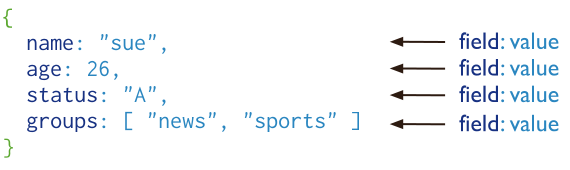
Documents are composed of field-value pairs and have the following structure:
{ field1: value1, field2: value2, field3: value3, ... fieldN: valueN }
The value of a field can be any of the BSON data types, including other documents, arrays, and arrays of documents. For example, the following document contains values of varying types:
var mydoc = { _id: ObjectId("5099803df3f4948bd2f98391"), name: { first: "Alan", last: "Turing" }, birth: new Date('Jun 23, 1912'), death: new Date('Jun 07, 1954'), contribs: [ "Turing machine", "Turing test", "Turingery" ], views : Long(1250000) }
The above fields have the following data types:
_idholds an ObjectId.nameholds an embedded document that contains the fieldsfirstandlast.birthanddeathhold values of the Date type.contribsholds an array of strings.viewsholds a value of the NumberLong type.
Field Names
Field names are strings with specific restrictions and requirements.
General Restrictions
The general restrictions for field names are:
Field names cannot contain the
nullcharacter.The server permits storage of field names that contain dots (
.) and dollar signs ($).MongodB 5.0 adds improved support for the use of (
$) and (.) in field names. There are some restrictions. See Field Name Considerations for more details.
Uniqueness Requirements
Field names must meet the following uniqueness criteria:
Each field name must be unique within the document. You must not store documents with duplicate fields because MongoDB CRUD operations might behave unexpectedly if a document has duplicate fields.
MongoDB doesn't support inserting documents with duplicate field names. While some BSON builders may support creating such documents, MongoDB doesn't support them, even if the insert succeeds, or appears to succeed.
Updating documents with duplicate field names isn't supported, even if the update succeeds or appears to succeed.
For example, inserting a BSON document with duplicate field names through a MongoDB driver may result in the driver silently dropping the duplicate values prior to insertion, or may result in an invalid document being inserted that contains duplicate fields. Querying those documents leads to inconsistent results.
Starting in MongoDB 6.1, to see if a document has duplicate field names,
use the validate command with the full field set to
true. In any MongoDB version, use the $objectToArray
aggregation operator to see if a document has duplicate field names.
Note
For restrictions specific to the _id field, see The _id Field.
Dot Notation
MongoDB uses the dot notation to access array elements and embedded document fields.
Arrays
To specify or access an array element by its zero-based index position, concatenate the array name and the zero-based index position using dot notation, and enclose the result in quotes:
"<array>.<index>"
For example, given the following field in a document:
{ ... contribs: [ "Turing machine", "Turing test", "Turingery" ], ... }
To specify the third element in the contribs array, use "contribs.2".
For examples querying arrays, see:
Tip
$[]all positional operator for update operations,$[<identifier>]filtered positional operator for update operations,$positional operator for update operations,$projection operator when array index position is unknownQuery an Array for dot notation examples with arrays.
Embedded Documents
To specify or access a field of an embedded document, concatenate the embedded document name and the field name using dot notation, and enclose the result in quotes:
"<embeddedDocument>.<field>"
For example, given the following field in a document:
{ ... name: { first: "Alan", last: "Turing" }, contact: { phone: { type: "cell", number: "111-222-3333" } }, ... }
To specify the
lastfield inname, use:"name.last".To specify the
numberfield in the nestedphonedocument, use:"contact.phone.number".
Warning
Partition fields cannot use field names that contain a dot (.).
For examples querying embedded documents, see:
Document Limitations
MongoDB documents have certain attributes, such as document size and field ordering, that can affect query behavior and application performance.
Document Size Limit
The maximum BSON document size is 16 mebibytes.
The maximum document size helps ensure that a single document cannot use an
excessive amount of RAM or an excessive amount of bandwidth
during transmission. To store documents larger than the maximum size, MongoDB provides the
GridFS API. For more information about GridFS, see mongofiles and
the documentation for your driver.
Document Field Order
Fields in BSON documents are ordered (unlike JavaScript objects).
Field Order in Queries
For queries, the field order behavior is as follows:
Field order is significant when comparing documents. For example:
{a: 1, b: 1}is equal to{a: 1, b: 1}{a: 1, b: 1}is not equal to{b: 1, a: 1}
The query engine may reorder fields for efficient execution. Field reordering may occur in intermediate and final query results, and may occur with the following projection operators:
Important
Because some operations may reorder fields, do not rely on specific field ordering in results from queries using the projection operators above.
Field Order in Write Operations
For write operations, MongoDB preserves the order of the document fields except for the following cases:
The
_idfield is always the first field in the document.Updates that include
renamingof field names may result in the reordering of fields in the document.
The _id Field
In MongoDB, each document stored in a standard collection requires a unique
_id field that acts as a primary key. If an inserted
document omits the _id field, the MongoDB driver automatically
generates an ObjectId for the _id field.
This also applies to documents inserted through update operations with upsert: true.
Note
In time series collections,
documents do not require a unique _id field because MongoDB does
not create an index on the _id field.
Behavior and Constraints:
When creating a collection, MongoDB creates a unique index on
_idby default.The
_idfield is always the first field in a document. If the server receives a document that does not have the_idfield first, then it moves the field to the beginning of the document._idsubfield names cannot begin with a ($) symbol.The
_idfield can contain any BSON data type except array, regex, or undefined.
Common _id Value Options:
The following are common options for storing values for the _id field:
Use an ObjectId.
Use a natural unique identifier, if available. This saves space and avoids additional indexes.
Generate an auto-incrementing number.
Generate a UUID as a BSON
BinDatatype for efficient UUID storage in the collection and_idindex.Index keys that are of the
BinDatatype are more efficiently stored in the index if:the binary subtype value is in the range of 0-7 or 128-135, and
the length of the byte array is: 0, 1, 2, 3, 4, 5, 6, 7, 8, 10, 12, 14, 16, 20, 24, or 32.
Use your driver's BSON UUID facility to generate UUIDs. Be aware that driver implementations may implement UUID serialization and deserialization logic differently, which may not be fully compatible with other drivers. See your driver documentation for information concerning UUID interoperability.
Note
Most MongoDB driver clients include the _id field and
generate an ObjectId before sending the insert operation to
MongoDB. However, if the client sends a document without an _id
field, the mongod adds the _id field and generates
the ObjectId.
Other Uses of the Document Structure
In addition to defining data records, MongoDB uses the document structure in several other contexts, including query and data-manipulation operations.
Query Filter Documents
Query filter documents specify conditions for read, update, and delete operations.
You can use <field>:<value> expressions to specify the equality condition
and query operator expressions.
{ <field1>: <value1>, <field2>: { <operator>: <value> }, ... }
For examples, see:
Update Specification Documents
You can use update operators to specify field modifications:
{ <operator1>: { <field1>: <value1>, ... }, <operator2>: { <field2>: <value2>, ... }, ... }
For examples, see Update Documents in a Collection.
Index Specification Documents
Index specification documents define fields to index and their types:
{ <field1>: <type1>, <field2>: <type2>, ... }